Showing posts with label computers. Show all posts

US and UK banning the use of Kaspersky anti-virus

by Michael Smith (Veshengro)

kaspersky-internet-security-21-700x393Not only the government agencies are on the bandwagon, even Barclay's Bank is advising its customers who got it free via the Bank to stop using it.

I am going out on a limb here now and say that this is because Kaspersky anti-virus is one of the best in catching Trojans and thus the government agencies want people to stop using it under false pretenses.

A little like the list of security software that the FBI published a while back where those that catch (almost) all viruses, malware, etc. were listed as bad performers.

Britain's main cyber security agency has warned British government agencies to avoid using anti-virus software from Russian companies, the latest in a series of moves targeting Moscow-based security software maker Kaspersky Lab.

In a letter to departmental permanent secretaries, the director of the UK National Cyber Security Centre, Ciaran Martin, said Russian-made anti-virus software should not be used in systems containing information that would harm national security if it was accessed by the Russian government.

He said his agency is in talks with Kaspersky Lab to develop a system for reviewing its products for use in Britain.

Kaspersky's anti-virus software was banned from U.S. government networks earlier this year on concerns the company has close ties to intelligence agencies in Moscow and that its software could be used to enable Russian spying.

Kaspersky has strongly denied allegations about the safety of its products or ties to the Russian government, saying it has become a scapegoat in the midst of rising tensions between Washington and Moscow.

British bank Barclays said on Saturday it had stopped offering Kaspersky anti-virus products to customers.

“Even though this new guidance isn't directed at members of the public, we have taken the decision to withdraw the offer of Kaspersky software from our customer website,” Barclays said in a statement.

This is (1) Russophobia gone over the top and (2), and I may be going out on a limb here, could just be that Kaspersky's products (and some others from Eastern Europe) recognize government Trojans and such like better than possibly those that the agencies wish to promote instead. Can't have government Trojans now recognized, can we.

Just thinking aloud...

© 2017

Back to school: R2 Certified refurbished computers save money and resources

gadgets

Instead of buying a new computer or mobile device for your kids going back to school, consider purchasing a certified refurbished one.

While the pull to buy the latest and greatest device for yourself or your children may be strong, a far better choice, both for your wallet and the environment, might be to purchase an older model that's been refurbished, which can save you money and be a better use of resources.

The market for used previously owned electronics is quite large, and that may be good for consumers in some aspects, as there is a lot of choice, it can also be quite the minefield to navigate, because not only is there a big difference between a used device and a refurbished one, there is also quite a big gray area when it comes to the quality of the refurbishing. A used device sold directly by the original owner to another owner comes with no guarantees of any kind, and any assurances given by the seller that the device works great and has been well taken care of have to be taken with a grain of salt - after all, who's going to be able to sell you a gadget after telling you that it's basically been rode hard and put away wet?

Read more here.

Browser exploit allows for secret flooding of hard disk

by Michael Smith (Veshengro)

filldiskThe new website Filldisk.com uses a dangerous HTML5 security hole which affect browsers Chrome, Safari, Opera and Internet Explorer. Alone clicking on the website makes it possible that in only a few seconds many Gigabytes of picture of cats will accumulate on the hard drive of the PC. Only users of the Firefox browser currently cannot be attacked.

The developer responsible for the website is the programmer Feross Aboukhadijeh who already on February 27, 2013 presented the “HTML 5 Hard Disk Filler API” on his Blog.

By means of a script can any website get prepared in such a way that within seconds the hard drive of each and every visitor will be flooded with a great mass of data. In the case of the demonstration by Aboukhadijeh on Filldisk.com (Warning! Already by simply opening the website the download begins and the hard disk will be flooded) every second an almost uncountable amount of picture of cats are being transferred.

While it is possible, in this case, because it is a demonstration, to erase this data garbage again with a simple click, a serious attacker intent on doing harm, however, will, more than likely, not offer such an option to any victim.

The reason that such an attack is at all possible is due to the new localStorage function of HTML5. This makes it possible instead of small cookies with just a very small amount of bytes also to deposit large amount of data on the computer of the user.

The browser's job is, indeed, to limit the possible amount of memory use of each and every website and, depending of the software every domain can deposit but 5MB of data, but that is a case of “theoretically”.

The developers of Google Chrome, Safari, Opera and Internet Explorer have, unfortunately, not considered that such misuse could come via many subdomains. The exploit Aboukhadijeh's gains access over 1.filldisk.com, 2.filldisk.com... so much on hard disk space as it would like.

In the official documentation for HTML5 the developers have actually ywarned about this possibility but only users of Firefox receive at the demonstration website the message that the bug does not exist in their browsers. Yet again a reason to choose and use Firefox, methinks.

Despite the fact that Aboukhadijeh has informed, via the bug reporting systems, all of the developers of the affected browsers but so far no steps have been taken to rectify the matter in the affected browsers.

© 2013

Users Hammered by Fake Antivirus Resurgence, warns GFI Labs

GFI® Software has identified new variations of rogue security code aimed at businesses and consumers, often distributed through spam carrying the Blackhole exploit

London, UK, March 2012 : GFI Software has released its VIPRE® Report for February 2012, a collection of the 10 most prevalent threat detections encountered during the month. Most notably, GFI Labs has been documenting a new wave of fake antivirus applications (or rogue AV) on its Malware Protection Centre blog. Growing since the start of the year, last month brought a significant spike in new variations of rogue AV.
“While the velocity at which rogues were successfully propagating may have slowed toward the end of last year, they are certainly back now, and they remain a popular tactic among cybercriminals,” said Christopher Boyd, senior threat researcher at GFI Software. “Users should not let their guard down. As always – no matter how convincing they look – always take the time to evaluate any piece of software that claims your PC is infected, prompts you for a credit card number or asks you to share any sensitive data, especially if it’s software that you or your employer did not install.”

Many rogue AV programs are being distributed via spam containing malicious links to the Blackhole exploit, a tool used by cybercriminals to target unpatched vulnerabilities in software applications from industry leaders like Microsoft Corp. and Adobe Systems Inc. Users infected by rogue AV may be redirected to fraudulent websites, have their systems hijacked by software appearing to scan their PCs or plagued by messages warning of viruses and other PC security risk. These scareware tactics trick users into providing credit card data to purchase non-existent protection.

Rogue AV utilities are continually tweaked in an attempt to avoid detection, with newer variants of these malicious applications propagating every 12 to 24 hours. When confronted with suspected rogue AV, users can visit the Malware Protection Centre for removal advice or download GFI Software’s free virus removal tool, VIPRE® Rescue.

Movie Fans Targeted, Gamers Under Fire
Industry experts discovered that the personal web site of Twilight author Stephenie Meyer had been compromised, resulting in the site serving malware to visitors. The site had been compromised to host Crimepack, an exploit kit that takes advantage of known vulnerabilities of various Web browsers and the Windows® OS to install malware. Computers exploited by Crimepack can be turned into so-called ‘zombie’ clients, whereby criminal groups can control the infected machines remotely, using them to undertake an array of malicious tasks, such as spamming and launching denial of service (DoS) attacks.

Gamers were targeted via YouTube videos encouraging users to download a program that would generate codes that could be redeemed for free Microsoft Points, the online currency used by millions of Xbox® users worldwide. The bogus generator prompted the victim to fill out various surveys in order to receive a password and continue the code generation.

Despite the best efforts of Microsoft and a number of security specialists, the Kelihos Botnet has continued to gain momentum in the wild. Capable of sending out billions of spam emails in a day, Kelihos has been used to bombard users with spam relating to pornography, Viagra®, and fake pharmaceutical companies. After being suppressed towards the end of 2011, evidence uncovered by industry experts suggests that a new variant is on the loose, rebuilding the botnet and adding to the global spam burden.

Other high profile scams detected during February included a gift card scam that appeared on a fake Tumblr blog, in time for Valentine’s Day, which purported to be from lingerie firm Victoria’s Secret. With the company about to open its first UK outlets, we may see more localised examples of this in the coming months.

Top 10 Threat Detections for February
GFI’s top 10 threat detection list is compiled from collected scan data of tens of thousands of GFI VIPRE Antivirus customers who are part of GFI’s ThreatNet™ automated threat tracking system. ThreatNet statistics revealed that Trojans once again dominated the list, taking half  of the top 10 spots.
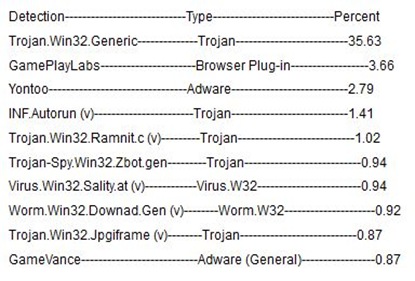
Malware List

About GFI Labs
GFI Labs specialises in the discovery and analysis of dangerous vulnerabilities and malware. The team of dedicated security specialists actively researches new malware outbreaks, creating new threat definitions on a constant basis for the VIPRE home and business antivirus products.

About GFI
GFI Software provides web and mail security, archiving and fax, networking and security software and hosted IT solutions for small to medium-sized businesses (SMB) via an extensive global partner community. GFI products are available either as on-premise solutions, in the cloud or as a hybrid of both delivery models. With award-winning technology, a competitive pricing strategy, and a strong focus on the unique requirements of SMBs, GFI satisfies the IT needs of organisations on a global scale. The company has offices in the United States, United Kingdom, Austria, Australia, Malta, Hong Kong, Philippines and Romania, which together support hundreds of thousands of installations worldwide. GFI is a channel-focused company with thousands of partners throughout the world and is also a Microsoft Gold ISV Partner.

This press release is presented for your information only.

Full Disclosure Statement: The GREEN (LIVING) REVIEW received no compensation for any component of this article.

This article is for your information only and the GREEN (LIVING) REVIEW does not (necessarily) approve, endorse or recommend the product, service or company mentioned.
Don’t post holiday travel plans on social media

by Michael Smith (Veshengro)

While this message is being repeated time and again it is once again, it would appear, something that is needed, yet again.

There is no such thing as 100 percent privacy on social media websites, and even so-called friends may not really be friends.

Therefore DO NOT post any information as to whether you are going away over the holidays and to where on Facebook, Twitter, or other forums and such like. This is one sure way of letting criminals know your home is empty. Thus it is not a very good idea even though you may think you MUST keep your “friends” and followers informed every minute of the day what you are doing and where you are.

Avoid you home being targeted by burglars by keeping all that information until later. There is no need for everyone to know where you are and what you are doing. Also and especially resist the urge to broadcast their location on Twitter or through “geotagging” which posts the users exact location on Facebook and other sites.

There are ways of protecting yourself by simply turning any “geotagging” facility simply off (permanently) and also not to have any address details posted on any of the sites, whether Facebook, Twitter, or what-have-you.

Parents need to be especially vigilant in watching what their children post on social media websites. Kids might brag about going on a ski vacation or post their current location as home alone while the parents are out shopping. This is dangerous information if it falls into the hands of the wrong people.

As we saw the hacking of Mark Zuckerberg’s own Facebook page, there is no such thing as 100% privacy on social media websites, and even so-called friends may not really be friends. Therefore it is best to not put anything on the Internet that could be used to find you or your home, and that includes photos that could be used for burglars and other criminals to track you and your home down.

Here are five tips for using social media safely:

  1. If you are traveling out of town, wait until you return home to post photographs and details about your trip. DO NOT do it while you are away. Criminals search for personal information on Facebook profiles and may discover an opportunity to burglarize your empty house.

  2. If you or your children are home alone for the day or the weekend, never post it as a status update on Facebook or tweet it.
  3. Thoroughly examine all the privacy options Facebook offers for the accounts of everyone in the family and choose the most restrictive settings. Review with your children who is on their friend’s list and verify they are truly friends.
  4. Do not post dates of birth and other sensitive personal information. Be aware not to accidentally publish answers to security questions, such as mother’s maiden name, the town you were born in or your favorite movie. Also avoid giving out information that could help narrow down your location, such as which high school a student attends.
  5. Turn off “geotagging” on Twitter and other social media sites to avoid telling strangers where you are and where you are not.

Your safety, that of your family, and of your home and possessions could be at risk if you reveal too much information about yourself, your family and your locations. Play it safe at all times.

Oh, and before I forget: this is valid for all occasions and not just the Christmas holidays and vacations.

© 2011

Massive solar flare sparks solar storm; possible threat to power grid, computers

Disruptions to power grids, satellite navigation systems and computer systems feared

By Michael Smith (Veshengro)

On June 7, 2011 the US Space Administration (NASA) registered the strongest solar storm since 2006 and it is feared that it could affect systems on Earth.

The most benign effect assumed will be increases aurora activities, that is to say it should be possible to witness awesome polar lights.

Other effects, on the other hand, which would be far from benign, could be damage to satellites, interruptions and other problems by the transmission of satellite communication and data, such as GPS, because of an increased mass of electrons in the ionosphere. Disruptions to power- and communications networks through induction are also possible.

While this event was bad enough, so to speak, space-weather experts are concerned about future solar events.

The sun's 11-year cycle of activity, driven by tangled surface magnetic fields, will hit its maximum in late 2013 or early 2014. Magnetic messiness will peak around that time and prompt nasty solar storms.

We will, however, probably see [extreme] flares every couple of months instead of years and if one of these powerful flares – and its coronal mass ejection – faces Earth, the particles will pound satellite components with charged particles, short some out, and potentially cripple them.

On the planet's surface, extra currents of solar particles drive extra electric current through power lines and heat them up. A solar storm in 1859, for example, caused telegraph lines to burst into flames. Power companies distribute loads to avoid such a disaster, but energetic solar storms could still blow transformers and lead to power outages, especially during heat waves like the one sweeping the eastern U.S. this week.

"Despite great countermeasures, the power grid is still vulnerable and we could be in for some serious problems, and not just, as if this were not bad enough, as regards the power grid. Communications, which today more often than not rely on satellites also could be severely crippled and impossible for days, if not longer.

This also could seriously effect and impact on aviation and maritime traffic as all communications, nowadays, are dependent on satellites, as does the navigational systems of aircraft and ships.

Yet another proof, if any more proof would be needed, that we have become too reliant and dependent on vulnerable high-tech equipment which could be put out of action by electromagnetic pulse and fields.

Individual computer centers could be secured by use of a Faraday cage and the same could, probably, be achieved for the PC at home, but the problem is that the Internet, the system of communication that we have become so dependent upon, and that includes me, as I am no Luddite, can and will suffer under such “attacks.”

So far, as time of writing, several days after the event on the sun, nothing awful seems to have happened so far but, as some scientists stated, it could be several days before the impact could be felt with all power.

This may, on the other hand, just be a “shot across the bow” and should be used as a wakeup call to harden our critical infrastructure systems and the Net is part of that critical infrastructure.

© 2011

Microsoft about to hand source-code of Skype to Russian secret service?

By Michael Smith (Veshengro)

The Russian daily Vedomosti and the British press agency Bloomberg announced the possible cooperation of the now Microsoft-owned business, Skype, with the Russian secret service, the FSB.

It is the aim, apparently, to hand over to the FSB part of the source-code for the application and by doing so they would hand the successor to the KGB a very powerful tool to intercept Skype communications.

Microsoft is, however, denying that this would be the case. They would, wouldn't they.

So far the Voice-Over-IP-service Skype is being considered as extremely secure. It is impossible for outsiders, due to complicated algorithms, to log themselves into chats or telephone conversation and thus monitor communications.

Even governments and their agencies, including secret services, do not have, according to official sources, the possibility to decode the data that is being sent via Skype, whichever form this data may be having. Skype has, so far, got the reputation that its encryption is of the highest military grade making it impossible to wiretap the conversations.

But, if the report by the news agency Bloomberg is anything to go by then this could change soon.

Ever since the acquisition of the Skype service by Microsoft the directors of company in Redmond have become very happy to cooperate with law enforcement agencies and intelligence services. That is why Skype is intending, so Bloomberg, to hand over pats of the source-code to the FSB.

It was rather obvious that, as soon as MS was getting their mitts on Skype they were going to screw up the privacy that Skype used to provide. MS, like Mark Zuckerberg of Facebook, do not know what privacy means. Or would MS otherwise deem it to be right to snoop on your and my PC when we connect to their sites for updates and such?

Should this indeed happen as indicated by the Bloomberg report then the successor organization to the KGB might not directly be given the “master key” with which to be able to tap in to each and every Skype call or chat but with the source-code they could find back doors with which to do just that.

Redmond, however, claims that there is nothing true on the reports but they would deny such things, would they not. People would be leaving the Skype service in droves, I am sure, should that those shenanigans by Microsoft become reality and, obviously, they don't want to spook the horses as yet.

In a statement to the Blomberg agency Microsoft reiterated that there are no moves afoot to give away the source-code for Skype but, then again, no one was talking about giving the source-code away to all and sundries now.

According to the Russian daily Vedomosti has the FSB been developing good relations to and with many software giants and Skype would not be the first program which the agency would be given full access to.

Maybe this will have to also be seen in the light of some recent communications that came out of Russia where it stated that the Russian government was going to switch over to Open Source altogether including Linux and such operating systems. Is Microsoft oiling the wheels so it can keep in with the Russian government?

© 2011

The desktop PC is not dead

Not by a long shot and neither should it be...

By Michael Smith (Veshengro)

computer_web-withtext The death of the desktop PC was rather prematurely announced and as far as I can see it might be the laptop that will lose out to netbook and smart phone rather than the desktop PC.

The desktop is easier to assemble and far easier to repair or upgrade and hence is superior to the laptop, though not, maybe, in terms of energy consumption. That could, however, also be solved by changing the type of power supply. On the other hand, the desktop, because of its ease in repair and upgrade, will outlast a laptop and netbook and therefore its environmental footprint, even with the slightly higher energy consumption is smaller than that of the laptop.

There are also desktop PCs about that are very good with energy and which are also nice and compact, such as and especially the “Broadleaf” PC from VeryPC, and UK company with the PCs being made in Britain. The entire PC, with the exception of the screen, is no larger than what was an external hard drive or DVD drive some years back and takes up very little space indeed.

Then there is/was also the Cherry Pal PC, though it would appear not much has been heard of this one for a while now, though, according to their website they still seem to be in existence. When it comes to the specs, however, it would appear that the Broadleaf PC from VeryPC is superior, as it has a proper internal hard drive of 250GB rather than just a 16GB flash memory.

The old larger machines, while, maybe, as said, not all that energy efficient, and that is due to the power supply, which all too often is far to big, in more than one sense of the word, still have much to offer too in way of sustainability than other computers. The latter simply because of the fact that they can be easily repaired and upgraded and that because of the way they are constructed and the fact that they are in a large (metal) case.

I am at a loss, to be perfectly honest, why people wish to declare the desktop PC for dead and try to get consumers and businesses onto laptops and netbooks and the cloud. If I would be so inclined I would, maybe, begin to read a lot more into this and one, possibly, should ask the “Quo bono?” question here.

One of the biggest problems with power consumption in a computer is bloated software, from operating systems to the rest. Microsoft Windows is getting bigger and bigger and, Windows also has the nasty habit of permamanetly doing something in the background. Even when the PC is not, actually, processing information the hard drive is spinning most of the time, which is noticeable from the HDD light being on. Not something that happens with, for instance, Linux operating systems.

Linus Ubuntu, even in its latest reincarnations, still comes on a CD (700MB) with all the additional software you may wish for, even for small business use, while MS Windows takes up several DVDs by now at 4GB each. It is therefore no wonder that old PCs are “obsolete”, as far as Windows OS is concerned, within a couple of years. No such problem with Open Source Operating Systems and general Open Source software.

An old(er) desktop PC, with Linux, can still outrun a dual-core laptop with Windows Vista or Windows 7 in startup time and general operations and thus we, who wish to keep things out of the waste stream should very much consider hanging on to those machines and improving them with the right software and the right hardware upgrades, where possible and affordable.

The desktop PC is not dead...

© 2011

USB Thumb Drives for longterm data storage

By Michael Smith (Veshengro)

Simple answer – NO

usb-stick While USB thumb drives, aka USB keys, and other names, are great for carrying data around with you in order to use on another PC or by way of software diagnostic tools, etc., I cannot and would not ever recommend to use such flash drives (another name for them) for longer or even long term data storage.

Why am I saying that?

The answer also is simple: I have had more than one of them crash on me and thus causing me to lose the data on the stick. Luckily, however, I had backed up the contents of the flash drive on a hard drive and thus still did have the raw data. I say “raw data” as I had also used the drive to work with the articles that were on there and thus lost quite a bit of work.

Therefore using such drives for longer term or long term storage is not something that I would consider and not even with good quality ones, but definitely not with the “cheap” ones that one gets given, nowadays as promotional items at events and (trade) shows.

On the other hand, they may be safe and I have just had a couple of rogue ones. I am, personally, not prepared to take that risk though, especially not for data that is seriously valuable and that I also may be moving from the hard drive where it was stored before.

Also, when making backups and storing data, make duplicate copies of the data that you have “burned” to CDs or DVDs, and store those backups of the data in protected sleeves or better still jewel cases and in such a way that they are not being used.

Well, I already have mentioned the data storage media that I would recommend and that is optical storage, on CD or DVD, and in no other way.

It is true that CDs and DVDs also can fail and that is why I recommend the backups of the data on discs that are then stored well away in a safe place that is fireproof, as well as protected from sunlight and other influences that could cause the deterioration of the disc and thus the destruction of the data.

USB thumb drives are, however, as said, a definite NO, NO for longer term and long term data storage, and here especially for sensitive data and data you do not want to or cannot afford to lose.

© 2011

Is Google Docs safe for backing up confidential information?

By Michael Smith (Veshengro)

The short answer here, I would say, must be an emphatic NO, and especially with regards to any sensitive information, and therefore I would suggest that no one would place any tax records or anything of such a similar nature.

When it comes to using Google Docs for storage, if we want to use the longer answer, it really depends on the user’s tolerance for risk and what his or her other options are.

If you place confidential information on Google Docs, the risks include: Google being compromised by hackers, Google itself using the documents for nefarious purposes, your account being compromised, governments or other third parties requesting and obtaining access to the documents, and Google losing your information. None of these outcomes are very likely, but they’re all risks to keep in mind.

I would suggest that you consider that – in the small print – Google reckons that by signing up for the service and using it you give your copyright for anything that you store with Google, as with many other free “cloud services”, and that it, Google, has the right, therefore, to make use of any of your material in any way that it, Google, sees fit.

Therefore, personally, I wouldn’t put confidential information on Google Docs in any way, shape or form. Keep regular backups of the data on my hard drive and be vigilant about the security of my machines.

Documents that you may only need to keep – such as tax records, etc. – and can therefore remove from your hard drive I would suggest you “burn” them onto optical media, onto CD or DVD. Do not keep such data that you may need to have access to at times on USB thumb drives either.

Therefore, store your stuff off-line, an best on media that is not something that could fail. It is for that reason that I suggest not to use USB thumb drives as they can, like hard drives, fail and crash and you could lose your data.

© 2011

Does a screen saver save energy?

No, far from it...

By Michael Smith (Veshengro)

EcoButtonWeb But you can turn the monitor off, that saves energy (if you use a desktop). You also do not need – far from it – the Eco Button. Your computer has energy saving functions; use them.

Screen savers, on the other hand, do not save energy at all, whatever you may think, or have been led to believe. In fact they use a great deal of energy as the computer, in fact, is processing buy running the screen savers. Also, screen savers are about Noah's age and are no longer needed today.

The Eco Button, which I have mentioned above, is a gadget that people will like to sell you with the claim that it will save you energy in your computer usage and that it, thus, is going to save CO2. To say that the marketeers for this products are a little on the economic side with the truth would be a serious understatement. The Eco Button just is another version of the sleep function that your PC or Laptop actually comes with. So why would you, therefore, need a gadget that – unless someone is giving it to you on a trade show or such (and if you can refuse it) – costs you up to $20?

Use your computer's energy saving functions. That's what they are there for. But the screen saver function is NOT one of them.

Every computer operating system is different and the keyboard controls that work with Microsoft Windows computers will not work, in general, with a Linux computer, for instance.

If you use a desktop, and as far as I am concerned, despite the fact that, according to sources a laptop uses up to 90% less energy than a desktop PC, as far as sustainability goes a desktop is the better way, and a CRT monitor then turn the monitor off when you are not using the computer. A CRT monitor is a serious energy hog. If you have an FST monitor then let the computer do it for you. The time is stands idle is fine.

Once again, don't use a screen saver to save energy; it won't work and don't use an Eco Button either.

© 2011

Download your Software instead getting on disc

by Michael Smith (Veshengro)

Software CDs are made out of nonrenewable petroleum products, and are difficult to recycle, though there are ways of re-purposing them but...

They are placed in plastic cases, often of a polycarbonate type (jewel cases), stuffed into boxes with manuals, & all wrapped in even more plastic.

This can all be eliminated if you download the software directly from the company via the Internet instead of shopping for it at the computer software store.

You won’t have to drive, the manufacturers won’t have to ship to the stores, and you can relax. So go green and save resources, as well as time & fuel.

Once downloaded you can store the software, as a backup, on your hard drive, an external drive or you burn the software to CD. Some software that is downloaded, especially such as Linux operating systems come down the line, comes as an ISO, that is to say a CD disc image, and will need to be burned to a CD in order to be able to be installed. That way you also have a full CD, in the same way as if you would have bought it in the box from a vendor, with manuals in PDF and such.

There is a great deal of software out there anyway that you can even download for free, and that includes, as said, entire operating systems, such as the various Linux distros, complete office suites and other stuff.

Much of this, such as Linux OSs and the likes of Open Office office suite, and others, fall under the Open Source Software label while others are so-called “freeware”. The latter often is a restricted version of one to be paid for, or one where the pro-version has more intricate features which most users would never need.

Open Office, for instance, is a complete – bar Outlook and the newest kind of things – replacement for MS Office and it is free and you can install it on as many computers as you wish, even for commercial use without committing any felony.

Then we have The Gimp: a replacement, basically, for Adobe Photoshop. This program is reckoned by many expert users to be superior in many aspects to Photoshop bar the fact that it does not have postscript output. Again, this program is free. Ever looked at Photoshop's prices?

None of those can be bought in a box and all are to be downloaded. Saves money and the environment.

Foxit PDF is a lovely PDF reader that is superior to Adobe Reader in many aspects, not alone for the fact that with Foxit you can highlight and annotate PDFs and it will retain those alterations.

PDF Creator is a free PDF making software that, though not having all the features of Adobe Acrobat, suffices for most people's use. It is used as a virtual printer and creates PDFs as good as the commercial packages. I have yet to discover whether it has the locking facilities that Acrobat has but then it does not cost me hundreds of dollars.

Open Office has a one-click PDF maker built in but it does not compress the data as well as does the stand-alone PDF Creator and therefore, personally, though it is nice to have the one-click facilitiy in Open Office, I tend to go round the slightly longer way – when not using Linux – of using the PDF Creator as a virtual printer to make the PDFs I need.

This is just a very small example of the material that you can download and that you do not even have to pay for. But whichever way; the recommendation is: download rather than get on CD. You then have the freedom to put it on CD at home but...

© 2009
<>

Free software for all

by Michael Smith (Veshengro)

Open Source software is the biggest open secret in the IT world.

Open Source software is free, secure, and supported by some of the world's largest software and hardware companies. The software they will be promoting includes OpenOffice, a complete office suite, Firefox, a secure web browser and Thunderbird, an email and calendar manager. Companies that are committed to open source include Dell, Hewlett Packard, Sun Microsystems and Novell.

Operating systems like Linux and BSD are safe and secure to use and some easier than others. The current one that I find, probably, to be the best is Ubuntu Linux in this regards.

Read more here...

Free software for all social enterprises, businesses and organisations in Humberside

NEWS RELEASE

A local agency is set to advise organisations and businesses in the area on the biggest open secret in the IT world.

The Humberside Co-operative Development Agency has been funded by Yorkshire Forward, the regional development agency for Yorkshire and the Humber, to raise awareness of OpenSource software.

OpenSource software is free, secure, and supported by some of the world's largest software and hardware companies. The software they will be promoting includes OpenOffice, a complete office suite, Firefox, a secure web browser and Thunderbird, an email and calendar manager. Companies that are committed to open source include Dell, Hewlett Packard, Sun Microsystems and Novell.

50% of the internet runs using OpenSource software, and many large government departments and companies use open source, including Lloyds TSB, Ebay, NASA, B.T., Bristol and Birmingham Councils to name only a few.

Jon Clarke, Director of Humberside CDA said "this is a fantastic opportunity for local organisations to cut costs and not performance"

For more information visit http://www.hossi.co.uk/ or call Sarah on 01482 564479 to book a place.

Source: Ethical Junction/Ethical Pulse
<>